Official documentation repository for the Raayan Mini STM32 Development Board, maintained by the Kernel Masters organization.
This repo aggregates user manuals, reference manuals, and device datasheets required to work with the Raayan Mini board in training and project environments.
Raayan Mini is an STM32-based industrial training board designed by Kernel Masters to bridge the gap between academic lab kits and real-world embedded systems work. It is used in their 6-month, hardware-centric embedded training programs.
Key hardware highlights (STM32F401RBT6):
- MCU: STM32F401RBT6 (ARM Cortex-M4, 32-bit, with FPU)
- Clock: up to 84 MHz
- Memory: 128 KB Flash, 64 KB RAM
- On-board peripherals (board level):
- 16×2 character LCD; optional TFT LCD interface
- UART, I²C, SPI, CAN, USB FS support
- On-board EEPROM & RTC over I²C
- User LEDs, switches, buzzer
- SWD debug connector (ST-Link V2)
- 3.3 V / 5 V breakout power for external modules
The repository is organized into four main documentation folders:
-
1_ARM_CoretxM4_Manuals- ARM Cortex-M4 architecture, core programming, and reference manuals.
-
2_STM32F4_Manuals- STM32F4 family reference manuals, datasheets, and programming guides.
-
3_RaayanMini_Manuals- Raayan Mini board user manuals (e.g., Rev 4.0/4.1), board overview, schematics, pinouts, and getting started guides.
-
4_Device_Datasheets- Datasheets for on-board and supported external devices (sensors, memories, communication modules, etc.).
These documents are used throughout Kernel Masters’ lab sessions, example projects, and coursework that target the Raayan Mini ecosystem (see related code repositories like stm32examples, raayanmini-4.0-4.1, and Raayanmini-Projects).
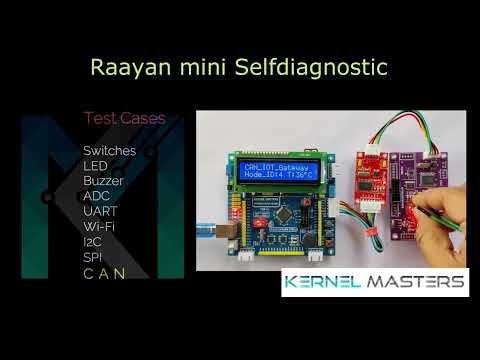
Before any custom firmware is flashed, every student / user must validate their board using the official test image and procedure:
- Kernel Masters pre-loads a self-diagnostic test image on each Raayan Mini before shipping.
- Once you receive the board:
- Follow the step-by-step test procedure shown in the official test video / manual.
- Verify all peripherals (LEDs, switches, LCD/TFT, UART, I²C devices, etc.) as instructed.
- If any test case fails, immediately:
- Inform the Kernel Masters admin team via the designated WhatsApp number / support contact.
- If no issue is reported after testing, it is assumed that the board is working correctly.
- Do not flash your own firmware before running the official board test.
- If you skip the test and overwrite the self-diagnostic image, Kernel Masters may not take responsibility for later issues.
This policy is to ensure that hardware problems are caught early and separated from firmware issues.
Typical use cases for learners and developers:
-
Getting started with the board
- Open
3_RaayanMini_Manualsand start with the latest Raayan Mini User Manual (e.g., Rev 4.0/4.1). - Follow the “Kit Contents” and “Getting Started” sections to power on and run the preloaded test firmware.
- Open
-
Studying the MCU & architecture
- Use:
1_ARM_CoretxM4_Manualsfor ARM Cortex-M4 architecture concepts.2_STM32F4_Manualsfor peripheral programming details (GPIO, UART, I²C, SPI, timers, ADC, etc.).
- Use:
-
Working with board peripherals
- Check
3_RaayanMini_Manualsfor:- Board pin mapping
- Block diagrams
- Example connections for external modules
- Use
4_Device_Datasheetswhen interfacing any on-board peripheral (EEPROM, RTC, sensors, etc.).
- Check
Raayan Mini and this documentation repository are part of Kernel Masters’ industry-oriented embedded systems training:
- Focus on bare-metal C, STM32 HAL, and register-level understanding.
- Progressive learning: from simple GPIO experiments to complex protocols (UART, I²C, SPI, CAN) and application-level projects.
- Used in real project repositories like:
- Biometric Attendance System
- Industrial CAN IoT Gateway
- Smart Weather Monitoring System
If you are a student in the program, this repository is your single source of truth for manuals and datasheets used in class and lab work.
This repo is primarily a documentation hub, not an open source codebase:
- External pull requests are welcome for:
- Fixing typos in filenames or structure.
- Adding links to updated official manuals or datasheets (where permitted).
- For board-related issues (hardware faults, missing manuals, etc.), please contact Kernel Masters support through the standard channels listed on their website rather than opening a GitHub issue.
- No explicit open-source license is declared in this repository at the time of writing.
- Assume that:
- PDFs and manuals belong to their respective copyright holders (ARM, STMicroelectronics, device vendors, and Kernel Masters).
- Documents are provided for educational and training use with the Raayan Mini board.
- If you want to reuse or redistribute any content outside of this context, please:
- Check the license terms inside each PDF/manual and, when in doubt,
- Contact Kernel Masters / raayanmini for permission.