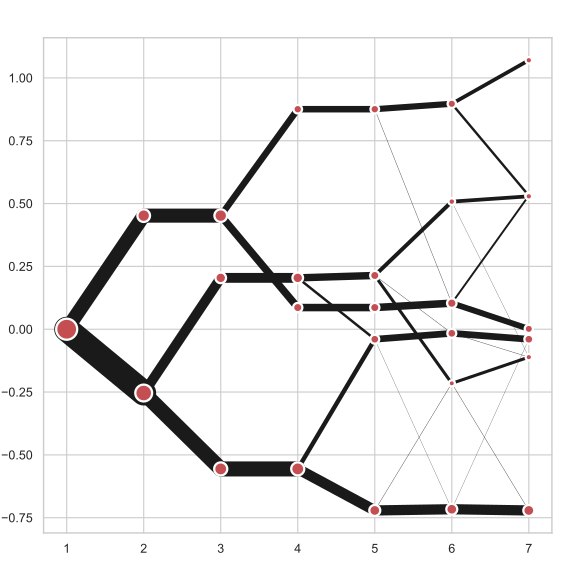

Clustergram is a diagram proposed by Matthias Schonlau in his paper The clustergram: A graph for visualizing hierarchical and nonhierarchical cluster analyses:
In hierarchical cluster analysis, dendrograms are used to visualize how clusters are formed. I propose an alternative graph called a “clustergram” to examine how cluster members are assigned to clusters as the number of clusters increases. This graph is useful in exploratory analysis for nonhierarchical clustering algorithms such as k-means and for hierarchical cluster algorithms when the number of observations is large enough to make dendrograms impractical.
The clustergram was later implemented in R by Tal Galili, who also gives a thorough explanation of the concept.
This is a Python implementation, originally based on Tal's script, written for
scikit-learn and RAPIDS cuML implementations of K-Means, Mini Batch K-Means and
Gaussian Mixture Model (scikit-learn only) clustering, plus hierarchical/agglomerative
clustering using SciPy. Alternatively, you can create clustergram using from_*
constructors based on alternative clustering algorithms.

You can install clustergram from conda or pip:
conda install clustergram -c conda-forgepip install clustergramIn any case, you still need to install your selected backend (scikit-learn and scipy
or cuML).
The example of clustergram on Palmer penguins dataset:
import seaborn
df = seaborn.load_dataset('penguins')
First we have to select numerical data and scale them.
from sklearn.preprocessing import scale
data = scale(df.drop(columns=['species', 'island', 'sex']).dropna())
And then we can simply pass the data to clustergram.
from clustergram import Clustergram

cgram = Clustergram(range(1, 8))
cgram.fit(data)
cgram.plot()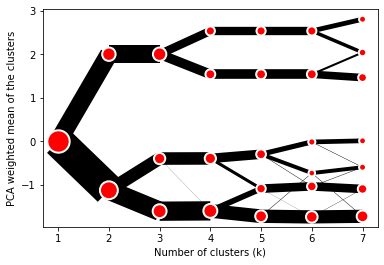
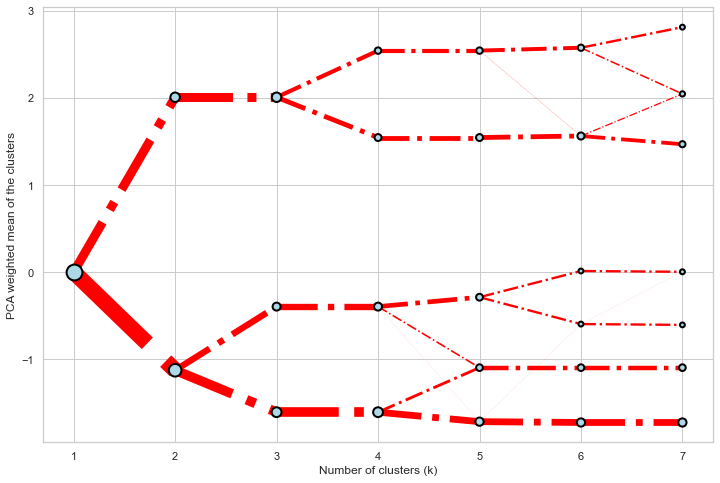
Clustergram.plot() returns matplotlib axis and can be fully customised as any other
matplotlib plot.
seaborn.set(style='whitegrid')

cgram.plot(
    ax=ax,
    size=0.5,
    linewidth=0.5,
    cluster_style={"color": "lightblue", "edgecolor": "black"},
    line_style={"color": "red", "linestyle": "-."},
    figsize=(12, 8)
)
On the y axis, a clustergram can use mean values as in the original paper by Matthias
Schonlau or PCA weighted mean values as in the implementation by Tal Galili.
cgram = Clustergram(range(1, 8))
cgram.fit(data)
cgram.plot(figsize=(12, 8), pca_weighted=True)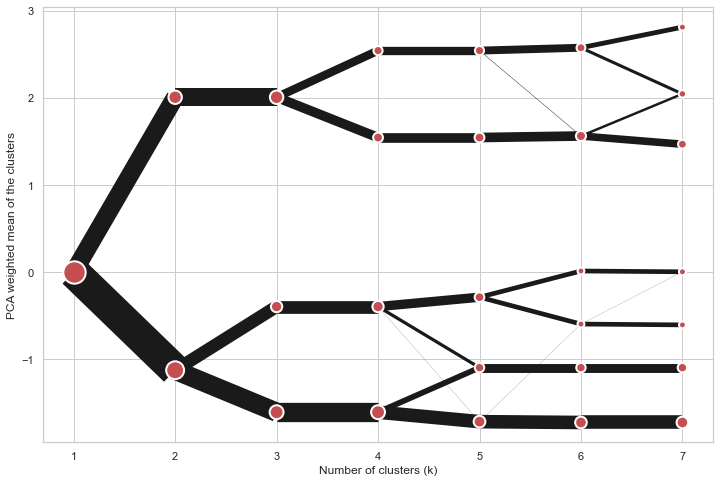
cgram = Clustergram(range(1, 8))
cgram.fit(data)
cgram.plot(figsize=(12, 8), pca_weighted=False)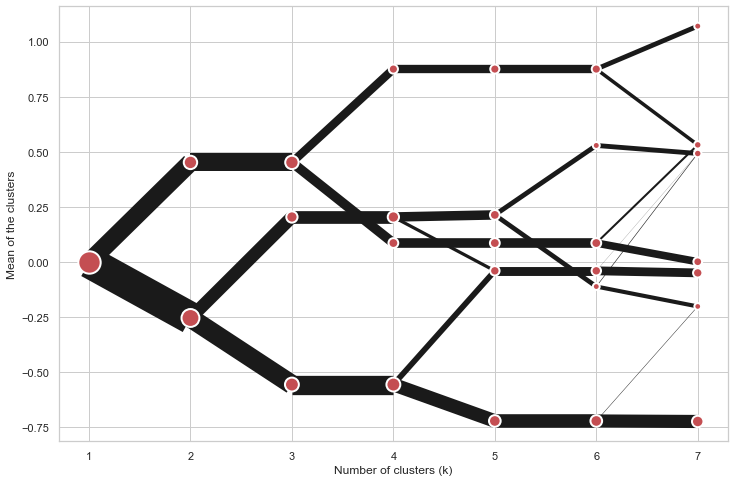
Clustergram offers three backends for the computation - scikit-learn and scipy which
use CPU and RAPIDS.AI cuML, which uses GPU. Note that all are optional dependencies
but you will need at least one of them to generate clustergram.
Using scikit-learn (default):
cgram = Clustergram(range(1, 8), backend='sklearn')
cgram.fit(data)
cgram.plot()
Using cuML:
cgram = Clustergram(range(1, 8), backend='cuML')
cgram.fit(data)
cgram.plot()
data can be all data types supported by the selected backend (including
cudf.DataFrame with cuML backend).
Clustergram currently supports K-Means, Mini Batch K-Means, Gaussian Mixture Model and
SciPy's hierarchical clustering methods. Note tha GMM and Mini Batch K-Means are
supported only for scikit-learn backend and hierarchical methods are supported only
for scipy backend.
Using K-Means (default):
cgram = Clustergram(range(1, 8), method='kmeans')
cgram.fit(data)
cgram.plot()
Using Mini Batch K-Means, which can provide significant speedup over K-Means:
cgram = Clustergram(range(1, 8), method='minibatchkmeans', batch_size=100)
cgram.fit(data)
cgram.plot()
Using Gaussian Mixture Model:
cgram = Clustergram(range(1, 8), method='gmm')
cgram.fit(data)
cgram.plot()
Using Ward's hierarchical clustering:
cgram = Clustergram(range(1, 8), method='hierarchical', linkage='ward')
cgram.fit(data)
cgram.plot()Alternatively, you can create clustergram using from_data or from_centers methods
based on alternative clustering algorithms.
Using Clustergram.from_data which creates cluster centers as mean or median values:
data = numpy.array([[-1, -1, 0, 10], [1, 1, 10, 2], [0, 0, 20, 4]])
labels = pandas.DataFrame({1: [0, 0, 0], 2: [0, 0, 1], 3: [0, 2, 1]})

cgram = Clustergram.from_data(data, labels)
cgram.plot()
Using Clustergram.from_centers based on explicit cluster centers.:
labels = pandas.DataFrame({1: [0, 0, 0], 2: [0, 0, 1], 3: [0, 2, 1]})
centers = {
            1: np.array([[0, 0]]),
            2: np.array([[-1, -1], [1, 1]]),
            3: np.array([[-1, -1], [1, 1], [0, 0]]),
        }
cgram = Clustergram.from_centers(centers, labels)
cgram.plot(pca_weighted=False)
To support PCA weighted plots you also need to pass data:
cgram = Clustergram.from_centers(centers, labels, data=data)
cgram.plot()Clustergram.plot() can also plot only a part of the diagram, if you want to focus on a
limited range of k.
cgram = Clustergram(range(1, 20))
cgram.fit(data)
cgram.plot(figsize=(12, 8))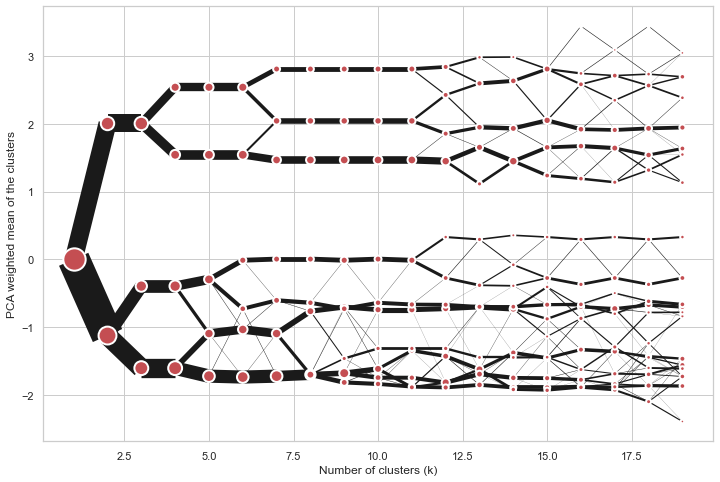
cgram.plot(k_range=range(3, 10), figsize=(12, 8))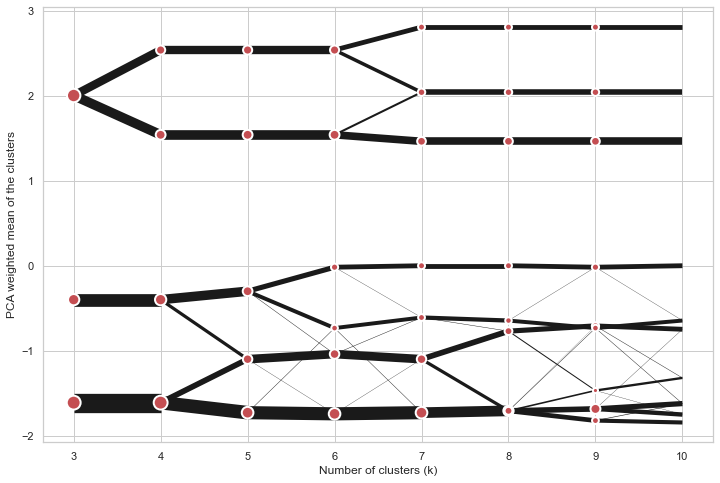
Clustergam includes handy wrappers around a selection of clustering performance metrics
offered by scikit-learn. Data which were originally computed on GPU are converted to
numpy on the fly.
Compute the mean Silhouette Coefficient of all samples. See scikit-learn
documentation
for details.
>>> cgram.silhouette_score()
2    0.531540
3    0.447219
4    0.400154
5    0.377720
6    0.372128
7    0.331575
Name: silhouette_score, dtype: float64
Once computed, the resulting Series is available as cgram.silhouette_. Calling the original
method will recompute the score.
Compute the Calinski and Harabasz score, also known as the Variance Ratio Criterion. See
scikit-learn
documentation
for details.
>>> cgram.calinski_harabasz_score()
2    482.191469
3    441.677075
4    400.392131
5    411.175066
6    382.731416
7    352.447569
Name: calinski_harabasz_score, dtype: float64
Once computed, the resulting Series is available as cgram.calinski_harabasz_. Calling the
original method will recompute the score.
Compute the Davies-Bouldin score. See scikit-learn
documentation
for details.
>>> cgram.davies_bouldin_score()
2    0.714064
3    0.943553
4    0.943320
5    0.973248
6    0.950910
7    1.074937
Name: davies_bouldin_score, dtype: float64
Once computed, the resulting Series is available as cgram.davies_bouldin_. Calling the
original method will recompute the score.
Clustergram stores resulting labels for each of the tested options, which can be
accessed as:
>>> cgram.labels_
     1  2  3  4  5  6  7
0    0  0  2  2  3  2  1
1    0  0  2  2  3  2  1
2    0  0  2  2  3  2  1
3    0  0  2  2  3  2  1
4    0  0  2  2  0  0  3
..  .. .. .. .. .. .. ..
337  0  1  1  3  2  5  0
338  0  1  1  3  2  5  0
339  0  1  1  1  1  1  4
340  0  1  1  3  2  5  5
341 0 1 1 1 1 1 5You can save both the plot and clustergram.Clustergram to a disk.
Clustergram.plot() returns matplotlib axis object and as such can be saved as any
other plot:
import matplotlib.pyplot as plt

cgram.plot()
plt.savefig('clustergram.svg')If you want to save your computed clustergram.Clustergram object to a disk, you can
use pickle library:
import pickle

with open('clustergram.pickle','wb') as f:
    pickle.dump(cgram, f)
Then loading is equally simple:
with open('clustergram.pickle','rb') as f:
loaded = pickle.load(f)Schonlau M. The clustergram: a graph for visualizing hierarchical and non-hierarchical cluster analyses. The Stata Journal, 2002; 2 (4):391-402.
Schonlau M. Visualizing Hierarchical and Non-Hierarchical Cluster Analyses with Clustergrams. Computational Statistics: 2004; 19(1):95-111.