The is an example to show how to generate and upload coverage report to Covergates for NodeJS.
We use Mocha + Istanbul for example.
But it does not mean you can only use this combination.
Basically, Covergates could work with any test framework that provides coverage report in lcov format.
More formats support is ongoing, you can find more detail on our GitHub repository.
It is assume that you have installed NodeJS version 12 or newer. If not, please refer to Downloads to get the latest version NodeJS.
To get start, please for this repository at first by click the Fork on the top-right of the repository page.
After that, clone the repository to your workspace with:
git clone https://github.com/<your account>/example-nodejs.git
cd example-nodejs/mocha_instanbulCovergates is available on NPM.
In this example, you can run:
npm install
covergates binary will be installed under node_modules/.bin/covergates.
The installation will download
covergatesbinary from https://github.com/covergates/covergates/releases. If you have no network connection, please refer to Command Line Tool to see how to download and installcovergatesmanually.
To install covergates for your own repository, run:
npm install covergates --save-dev
The test script is at test/test.js:
var assert = require('assert');
const { test } = require('../src');

describe('test', function () {
  it('could not divide zero', function () {
    const msg = test(0, 0);
    assert.equal(msg, 'divider could not be zero');
  });
});
It tests the test function in src/index.js.
To test it, run:
npm testYou will see the output like below:
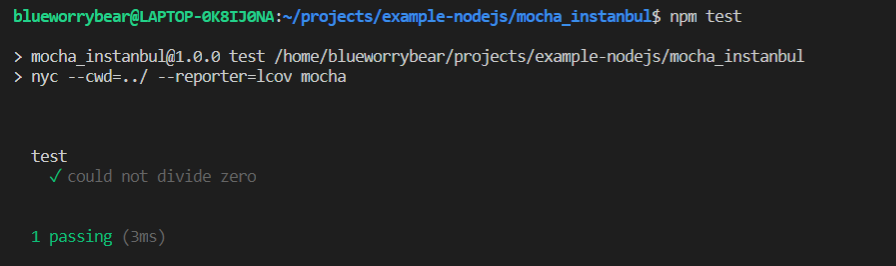
The coverage reports will be generated to ../coverage:

Before we upload the coverage report, you need to activate repository on Covergate.
Visit https://covergates.com/repo and click ACTIVATE right to the example-nodejs repository.

If you are using self-hosted Covergates, please replace https://covergates.com to your domain name.
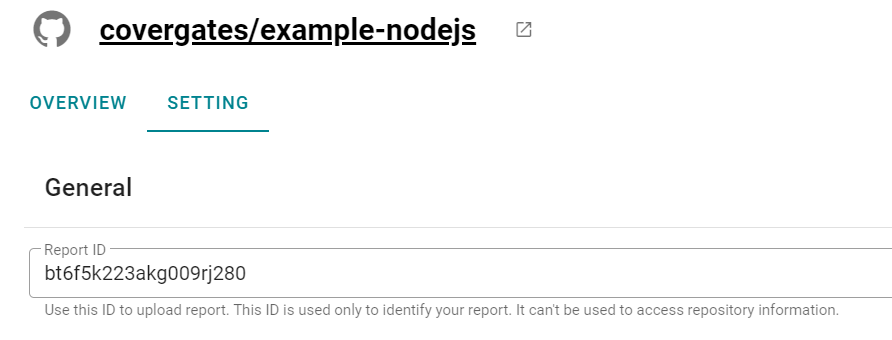
Visit repository setting page, you could find the Report ID which is used to upload report as below image shown:
To upload report, you need to prepare:
API_URL: The API URL to CovergateREPORT_ID: The Report ID found on the repository setting page.
You can pass these two variables with command line, for example:
npx covergates --url $API_URL upload --report $REPORT_ID --type lcov ../coverage/lcov.info"
The other way to setup these variables would be using dotenv-cli and cross-var, run:
npm install dotenv-cli cross-var --save-dev
Add upload to scripts in package.json:
"upload": "dotenv -- cross-var covergates upload --type lcov ../coverage/lcov.info"Create a .env file like this repository shows:
API_URL=https://covergates.com/api/v1
REPORT_ID=bt6f5k223akg009rj280
Replace the API_URL to your domain name if you are using self-hosted server and REPORT_ID to your own Report ID.
After that, run:
npm run uploadVisit your repository page to see the report!
The test framework in this example uses Istanbul to generate coverage report. It will use relative path in the report, for example:
TN:
SF:mocha_instanbul/src/index.js
FN:1,test
end_of_record
If your test framework using absolute path by default (Jest for example), you will need to covert it to relative path or using Filter setting to remove it with regular expression. Please refer to Repository Setting for more detail.