Releases: abrasic/blendpresence
BlendPresence 1.8.1

- Update pypresence to 4.3.0
- #22: Added support for NVIDIA Quadro GPU display text
- #18: Added ability to cycle thru available state types at a given interval
- #17: Added option to toggle off the '.blend' file extension when displaying file name
- #13: Added basic functionality to blacklist file names via regex from appearing on RPC. If the file name matches the expression, it will instead show the "Fallback" text supplied by the user
- Tip: If you want to match multiple names you can use the
|operator. Example:hello|world|foo|bar
- Tip: If you want to match multiple names you can use the
BlendPresence 1.8.0b

This update introduces new features and changes.
- Moved "Active Mode" into the new Icon Set system. It has been replaced with an overall "Enabled" toggle.
- (#11) Added new Icon Set feature, allowing you to choose between currently two:
- Active Mode: Just like the original Active Mode you're used to, it will display the current mode you're using.
- Active Workspace: BlendPresence will detect the name of your active workspace and will place the corresponding icon on your rich presence (as shown in the attachment above). For this to work, your current workspace name needs to be exactly one of the following:
Modeling,Sculpting,UV Editing,Texture Paint,Shading,Animation,Rendering,Compositing,Geometry Nodes,Scripting
- (#9) Added AMD Radeon support for "Display GPU" option
- This has been untested, please create an issue if problems arise
[Hotfix B] 11/28/2023:
- Fixed conditional that disallowed "Display GPU" to display beyond Blender 4.0
[Hotfix A] 6/27/2023:
- Removed deprecated function
bpy.app.version_char(Support for Blender 4.0)
BlendPresence 1.7.1
BlendPresence 1.7.0

- New "Display GPU" option in the Large Icon Tooltip. When enabled, the presence will display the name of the current GPU in use. It should support most NVIDIA GeForce cards (no AMD support yet).
- New "Current Scene" display type. It simply returns the name of the current scene.
- Minor changes to some operator descriptions
BlendPresence 1.6.0
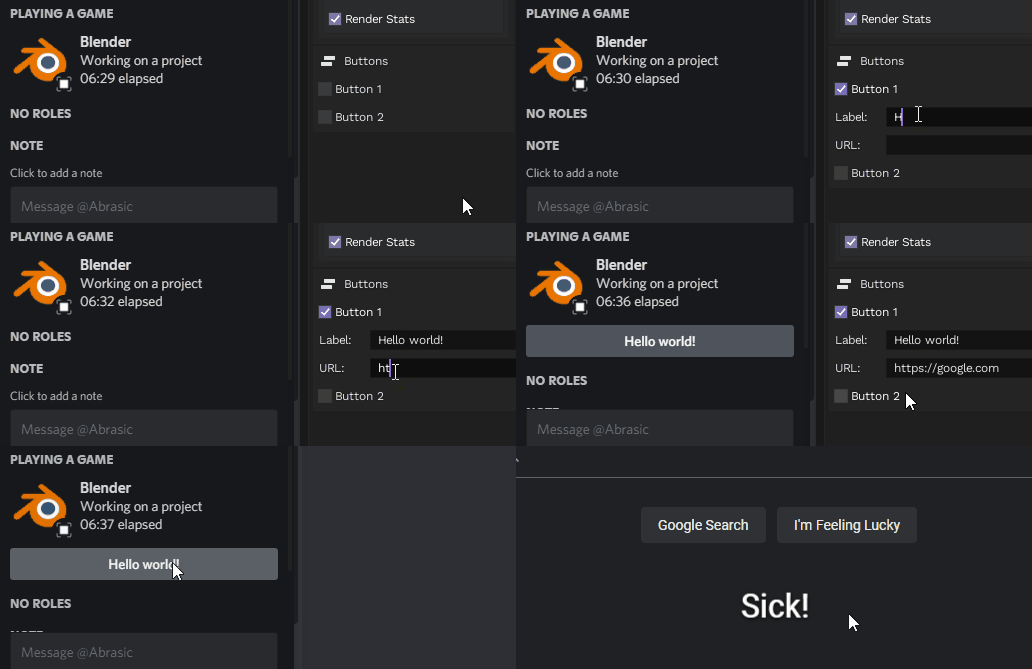
This version introduces button support that allows you to customize the label and URL of a maximum of two buttons. Show off your portfolios, socials or anything else!
BlendPresence 1.5.2
This version introduces updates to the large icon area.
-
Most popular render engines (excluding Cycles and Eevee) will receive their unique logo on top right of the blender logo. Currently this feature supports Redshift, Renderman, LuxCore
- Supported render engines above will also properly display correct capitalization in large icon text (ex. "LuxCore", not "Luxcore")
If you use an engine that's not on the list, please run the
bpy.context.enginecommand in the Blender console and send me the value that it returns!
BlendPresence 1.5.1
This update introduces repo organization alongside minor edits to the add-on.
- Fixed incorrect icon displayed for Particle Edit mode
- Fixed proper override of text when rendering
- Fixed "Enabled" feature
BlendPresence 1.5.0
This release focuses primarily on optimization, as well as attempting to make the add-on more lightweight.
- "Particle Edit Mode" added to Active Mode list
- The presence will now auto-reconnect if RPC connection is lost. For example, if you refresh the Discord client.
- There may be issues of blender crashing on startup if you don't have a Discord client open
- Upgraded pypresence to 4.2.0 (finally)
- Fixed rounding percentage error when rendering an animation
- Several code optimizations
- Removed functions that are no longer needed
BlendPresence 1.4.1
- As per request, File Size has been added as a display type.
- While rendering an animation, the percentage of total frames rendered will be displayed alongside the frame range.
BlendPresence 1.4.0
- Removed "Cycle" feature as it's no longer a necessary function. Due to this, all state display types are now placed in a single dropdown.
- "Keyframe Count" has been removed in replacement of "Frames Animated", which is a much more inexpensive way to show the total amount of frames animated (basically, getting the last keyframe in your scene)
- Added "Active Object" display.
Hotfix a: Changed version number in blender and supplied the actual version this time