Releases: Basssiiie/OpenRCT2-ParkRatingInspector
v0.3 release

This v0.3 release includes the following changes:
- Fixes an issue where the plugin would not count litter in RCT2 scenario files with a corrupted spawn time, because it didn't do the integer underflow like the vanilla game does it.
- Fixes an issue where stalls with intensity ratings would be included in the park rating calculation, whereas the vanilla game does not include them.
The plugin needs at least OpenRCT2 v0.4.0 to run, or any of the versions after that.
Installation
- Download the
ParkRatingInspector-v0.3.zipfile below. - Extract the
ParkRatingInspector.jsfile fromzip-file into your\OpenRCT2\pluginfolder.- Easiest way to find the OpenRCT2-folder is by launching the OpenRCT2 game, click and hold on the red toolbox in the main menu, and select "Open custom content folder".
- Otherwise this folder is commonly found in
C:/Users/<YOUR NAME>/Documents/OpenRCT2/pluginon Windows.
- Once the file is there, it should show up ingame in the dropdown menu under the map icon.
v0.2 release
This v0.2 release includes the following changes:
- Implement OpenRCT2/OpenRCT2#15566 which fixed a bug from the original RCT2 where recently dropped litter should not affect the park rating.
- Fix #13 where the plugin would crash on unsupported versions of OpenRCT2.
(!) Note: this plugin currently only supports OpenRCT2 v0.3.5, or any version released after the 16th of October 2021.
Any develop version released after the 16th of October 2021 should work. Once either OpenRCT2 v0.3.5 or v0.4 are released, those will work too.
Installation
- Download the
ParkRatingInspector-v0.2.zipfile below. - Extract the
ParkRatingInspector.jsfile fromzip-file into your\OpenRCT2\pluginfolder.- Easiest way to find the OpenRCT2-folder is by launching the OpenRCT2 game, click and hold on the red toolbox in the main menu, and select "Open custom content folder".
- Otherwise this folder is commonly found in
C:/Users/<YOUR NAME>/Documents/OpenRCT2/pluginon Windows.
- Once the file is there, it should show up ingame in the dropdown menu under the map icon.
v0.1 release
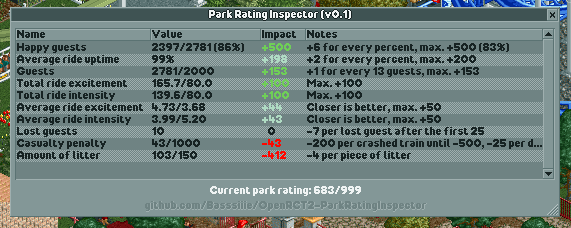
This plugin helps you break down your park rating and figure out why it is so low or so high. The inspector will show each of the different possible influences and how much they are currently affecting your rating, which should help you figure out where you can improve.
Note: this plugin currently only supports the newest develop!
Any develop version released after 11th of August should work. Once either OpenRCT2 v0.3.5 or v0.4 are released, those will work too.
Installation
- Download the
ParkRatingInspector-v0.1.zipfile below. - Extract the
ParkRatingInspector.jsfile fromzip-file into your\OpenRCT2\pluginfolder.- Easiest way to find the OpenRCT2-folder is by launching the OpenRCT2 game, click and hold on the red toolbox in the main menu, and select "Open custom content folder".
- Otherwise this folder is commonly found in
C:/Users/<YOUR NAME>/Documents/OpenRCT2/pluginon Windows.
- Once the file is there, it should show up ingame in the dropdown menu under the map icon.