OpenStreetMap-based 3D world generator. Originally it was part of Generation Streets, OSM-based video game. Now it is released as a separated command-line tool named rvtgen3d and distributed under free license as part of rsgeotools toolset.

Features:
- 3D buildings with roof decorations and entrances
- Roof shapes (only dome, onion and cone/pyramid are supported)
- Randomly generated rural houses
- Terrain surface map
- Road marking
- Trees and bushes
- Street lighting on roads and pavements
- Rail roads
- Power tower and power lines (limited support)
- Walls and fences
- Apocalypse-styled destroyed bridges
- Relief, based on other sources, see below
Please note that this toolset only can generate 3D models, no visual renderer provided. Also, it's designed for mass processing and may not be convenient for single use.
If you only want to see certain territory rendered in 3D, check out Generation Streets:
- Get Generation Streets on Steam. It's free, but you may want to unlock access to global coverage for ~$5.
To build your own command-line toolset, read instructions below.

- libgeos_c, LGPL-licensed, for rsgeotools-csv2rvtdata
- gdal, MIT/X style license, for processing heightmaps with rsgeotools-conv and for processing geodata
- libtiff-dev and geotiff-bin, for processing TIFF images
- osmctools (osmconvert and osmfilter) for initial processing OSM planet
- boost library
- zlib, bzip2 and pthread libraries
This toolset is designed to work on Linux.
Just run make.
Warning: compiled binaries (bin directory) and scripts (scripts directory) must be in PATH environment variable.
Warning: all paths in environment variables must be absolute.
- Download OSM Planet from https://planet.openstreetmap.org/ in PBF format.
- Run
RVT_O5M_DIR=<o5m dir> rsgeotools-planet-init.sh <planet-******.osm.pbf>.
Planet will be subdivided to zoom 7 tiles and saved to $RVT_O5M_DIR in o5m format.
In OpenStreetMap, large water areas are not stored as polygons, instead, natural=coastline tag is used (read more: https://wiki.openstreetmap.org/wiki/Coastline). Ready-to-use polygons are provided by osmdata.openstreetmap.de.
- Download
water-polygons-split-3857.zipfrom https://osmdata.openstreetmap.de/data/water-polygons.html and save it to$RVT_SHP_DIRdirectory. - Rename
shapefiles.<ext>toocean0_0_0.<ext>. - Split shapefiles up to zoom level 7:
cd $RVT_SHP_DIR
rsgeotools-subdiv-shapefile.sh 0 0 0 1 ocean
rsgeotools-subdiv-shapefile.sh 0 0 0 2 ocean && rm ocean1*
rsgeotools-subdiv-shapefile.sh 0 0 0 3 ocean && rm ocean2*
rsgeotools-subdiv-shapefile.sh 0 0 0 4 ocean && rm ocean3*
rsgeotools-subdiv-shapefile.sh 0 0 0 5 ocean && rm ocean4*
rsgeotools-subdiv-shapefile.sh 0 0 0 6 ocean && rm ocean5*
rsgeotools-subdiv-shapefile.sh 0 0 0 7 ocean && rm ocean6*- Split shapefiles up to zoom level 11 and pack them into .tar.gz for further usage:
rsgeotools-process-mass-subdiv-shapefile.sh 0 0 0 7 oceanYou will need to set $RVT_SHP_ARCHIVE_DIR (destination dir), $RVT_SHP_DIR (source dir, see above) and $RVT_TEMP_DIR (usually /tmp) environment variables.
Run rsgeotools-planet-process-full.sh 200331 0. First argument is a timestamp (YYMMDD is recommended). Process can take up to 2-3 weeks depending on your PC performance. In case you need to pause and resume the processing process, use second argument (0-11) to continue from certain stage. Current stage is always written in $RVT_GPAK_DIR/planet_process_log_file.txt.
Additional environment variables required:
RVT_GPAK_DIR-- output directory;RVT_CSV_CONF-- must be pointed toconf/osm-conf.inifile.
Relief is based on these two sources:
- NASADEM, see https://lpdaac.usgs.gov/products/nasadem_hgtv001/
- ASTER GDEM Version 3, see https://ssl.jspacesystems.or.jp/ersdac/GDEM/E/
Both sources have no restrictions on reuse, sale, or redistribution (see https://lpdaac.usgs.gov/data/data-citation-and-policies/).
Because NASADEM images is less noisy, this dataset has been selected as primary source. ASTER GDEM Version 3 is used if no data available in NASADEM dataset. You need to download both datasets before processing.
To start processing, run rsgeotools-process-hm-full.sh.
You will need to set following environment variables:
RVT_GPAK_DIR-- output directory for heightmap gpaks, it is recommended to make it different from geodata gpaks which was created above;RVT_HGT_DIR_NASADEM-- directory containing set of ZIP files of NASADEM;RVT_HGT_DIR_ASTERGDEMV3-- directory containing set of ZIP files of ASTER GDEM V3.
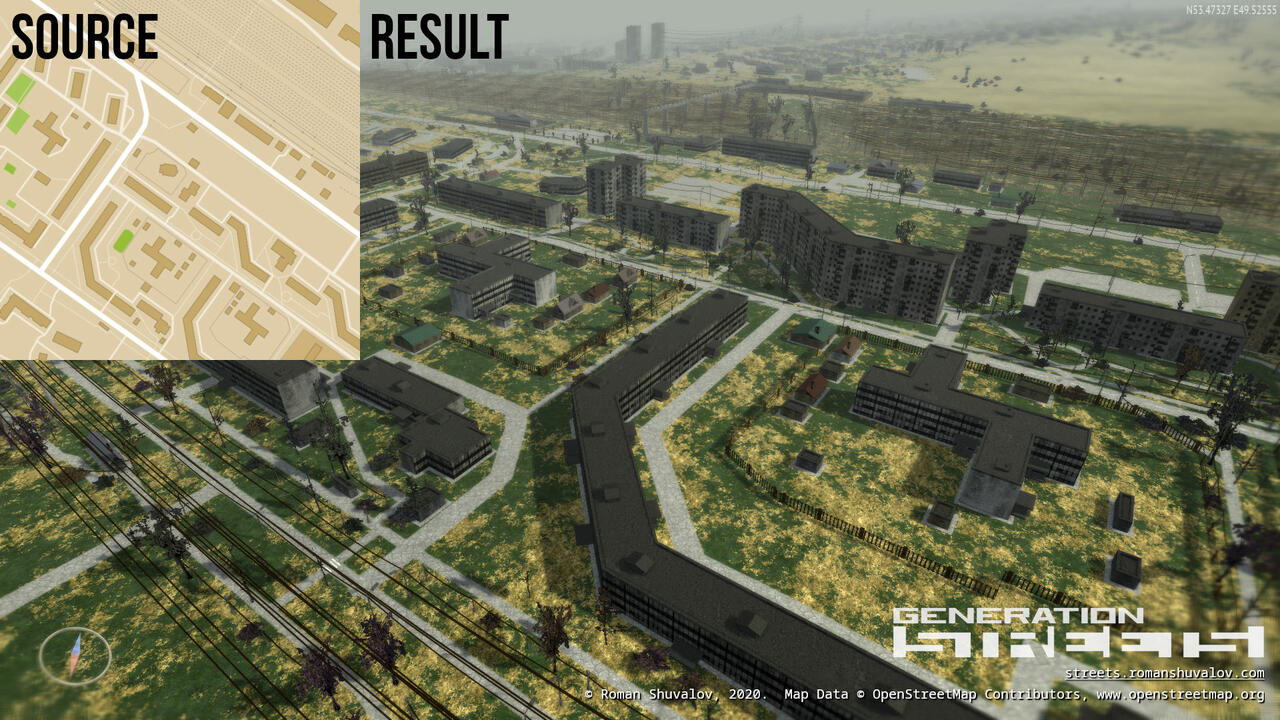
Run rsgeotools-rvtgen3d to generate 3D world.
- Required parameters:
- --x=, --y=, --w=, --h= - rectangle in tile coordinates at 14th scale. You can use
rsgeotools-convto get tile coordinate from lat/lon pair, or use third-party tools like Geofabrik's Tile Calculator; - --cache-dir= - path to
RVT_GPAK_DIR, without tailing slash.
- --x=, --y=, --w=, --h= - rectangle in tile coordinates at 14th scale. You can use
- Optional parameters:
- --output-dir= - path to output directory;
- --data-dir= - path to
rvtgen3d-data; - --disable-timestamp-folders - by default, separated output folder with unique name will be created. This option disables this feature;
- --flat-terrain - disable relief;
- --z-up - define Z axis as vertical. Default is Y;
- --merge - merge all tiles into one file. Not recommended for large areas;
- --disable-edge-smoothing;
- --obj - set output format to .obj instead of .ply;
- --disable-decorations - disable building decorations;
- --drop-no-outer-ring - ignore broken multipolygons which have no outer ring.
Following layers will be generated:
- Surface geometry
- Buildings
- Surface map (area)
- Surface map (roads and rivers)
- Naturals
- Props
- Wires
- Stripes
- Walls
Buildings layer has FlagsA and FlagsB vertex attributes.
- Attribute
FlagsAcontains building texture type: residential (1), commercial (2) or industrial (4). - Attribute
FlagsBcontains surface type flags: roof (1), flat wall without windows (4).
In .ply, FlagsA is stored in color alpha component, FlagsB is stored in 4th component of normal (nw).
In .obj, vertex has following format: PosX, PosY, PosZ, ColorR, ColorG, ColorB, FlagsA, FlagsB.
Surface map layer is coded with following colors:
| Surface | RGB vertex color |
|---|---|
| Water | (0.0, 1.0, 0.0) |
| Asphalt | (0.2, 0.0, 0.0) |
| Ground (default) | (0.5, 0.0, 0.0) |
| Grass | (0.7, 0.0, 0.0) |
| Sand | (0.0, 0.0, 0.2) |
| Quarry (rock) | (0.0, 0.0, 0.7) |
Most of the code is distributed under 3-clause BSD license, see LICENSE.
Note that toolset also contains code based on third-party projects licensed under different licenses, in that cases license provided in source code.